
Speed and security aren’t optional for modern WordPress. While Rapyd Cloud is built for high performance, stability, and secure managed hosting, infrastructure is only part of what visitors experience. Real-world speed and reliability are also shaped by global network delivery, intelligent caching, and edge-level protection.
That’s where Cloudflare comes in. Cloudflare powers one of the world’s largest edge networks, with 300+ data centres globally, and is trusted by millions of websites to deliver content closer to visitors while mitigating threats before they reach origin servers. It’s a common choice for WordPress and eCommerce sites because it combines performance acceleration with industry-leading security features, including an advanced Web Application Firewall.
In 2026, Rapyd Cloud deepened its commitment to performance and reliability by partnering with Cloudflare. Through this partnership, Rapyd Cloud Managed WordPress Hosting customers can enable an integration powered by Cloudflare Enterprise CDN capabilities — bringing faster delivery, stronger protection, and improved resilience at the edge.
In this blog, we’ll break down what the Enterprise Cloudflare CDN integration does, how it improves performance and reliability for WordPress sites, and what to expect when you enable it on Rapyd Cloud.
Brief Overview of Cloudflare

With the Enterprise Cloudflare CDN enabled, website content is cached and delivered from data centers closer to end users. This reduces the physical distance data must travel, resulting in a consistent experience and faster page loads for visitors across different geographic regions.
Whether serving local audiences or international traffic, customers can expect improved responsiveness without complex configuration or third-party CDN management.
Ultra-fast Global Delivery
Enterprise Cloudflare CDN operates on one of the world’s largest content delivery networks, with hundreds of data centers spanning across the globe. This means website content is served from locations near visitors, significantly reducing latency and improving the user experience worldwide.
Cost Efficiency and Ultra-fast Global Delivery
By reducing origin server load and decreasing bandwidth usage through smart caching and edge delivery, the Enterprise CDN helps lower hosting and bandwidth costs at scale while serving very large audiences with consistent performance.
Reduced Server Load and Improved Efficiency
By caching static and cacheable assets at the network edge, Enterprise Cloudflare CDN helps minimize the number of requests that reach the origin server. This reduces server load, lowers bandwidth usage, and improves overall hosting efficiency, especially during traffic spikes. (Which is our goal at Rapyd Cloud)
For growing websites and applications, this translates into smoother performance and better resource utilization.
Rapyd Cloud Enterprise Cloudflare CDN Integration: Features and Benefits
A fast and reliable online presence is essential for the success of any website, whether you operate a digital agency, manage a WordPress blog, or run an online business. Today’s users expect websites to load instantly, and even small performance delays can negatively impact user experience, conversions, and search engine rankings. Simply having a website is no longer enough.
While Rapyd Cloud delivers optimized performance at the hosting level, website speed is also heavily influenced by how efficiently content is delivered to visitors worldwide. Network distance, traffic spikes, and regional latency all play a role in real-world performance. This is where an enterprise-grade CDN becomes critical.
With the Enterprise Cloudflare CDN integration, Rapyd Cloud websites benefit from delivery powered by Cloudflare’s globally distributed network, one of the largest and most reliable in the world. Cached content is served from data centers closest to each visitor, ensuring consistently fast load times regardless of geographic location. Static assets such as images, stylesheets, and JavaScript files are delivered at the edge, significantly reducing latency and improving overall page performance for WordPress sites.
By offloading static content delivery to Cloudflare’s enterprise network, websites experience faster load times, greater performance consistency for global audiences, and reduced strain on the origin server. This architecture not only improves day-to-day performance but also helps sites remain stable and responsive during traffic surges and peak usage periods.
With the Rapyd Cloud Enterprise Cloudflare CDN integration, customers can access and benefit from the following features:
- Global content delivery through Cloudflare’s distributed network
- DNS management within the Rapyd dashboard
- Full Page Cache optimized for dynamic sites
- Static asset caching for faster page loads
- Reduced latency for visitors across different geographic regions
- Lower origin server load and bandwidth usage
- Improved availability during traffic spikes
- Secure content delivery over HTTPS
- Basic network-level traffic filtering
This integration allows Rapyd Cloud customers to enhance website performance, reliability, and scalability using a trusted, enterprise-grade CDN solution, while keeping setup, control, and management simple within their existing hosting environment.
How to Activate & Manage Cloudflare on Rapyd Cloud
Below are a few simple steps to integrate Cloudflare with Rapyd Cloud.
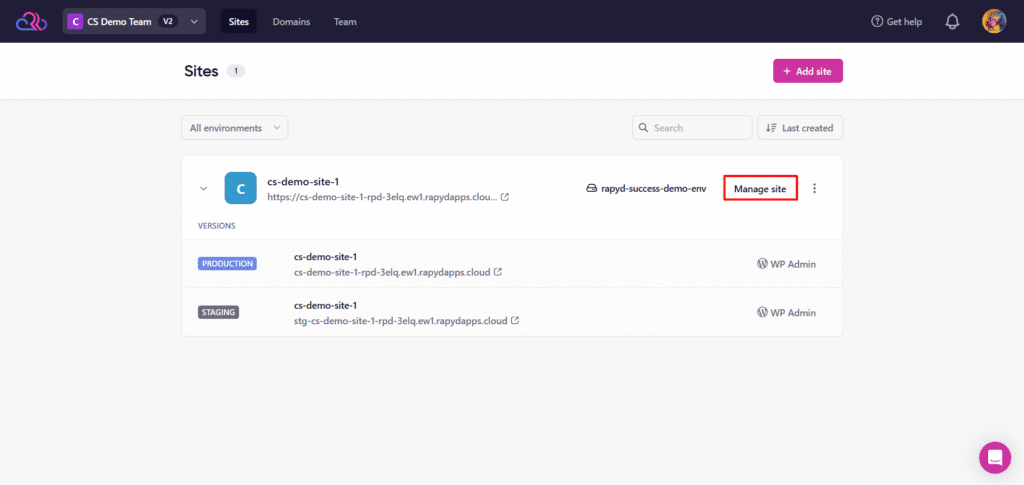
Step 1: Open Site Management
- Log in to your Rapyd Cloud dashboard.
- Go to the Sites section from the top navigation.
- Locate the site you want to configure.
- Click Manage site next to the selected site.
This will open the site management panel for your chosen environment.
Step 2: Navigate to Domains
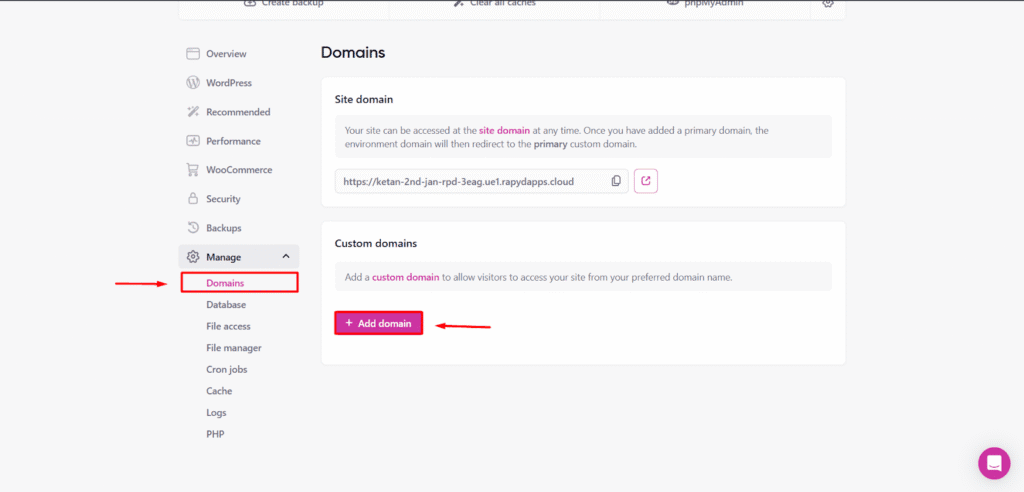
- From the left sidebar, click Manage.
- Select Domains from the expanded menu.
- In the Custom domains section, click Add domain.
This starts the process of adding a custom domain to your site.
Step 3: Set Website URL
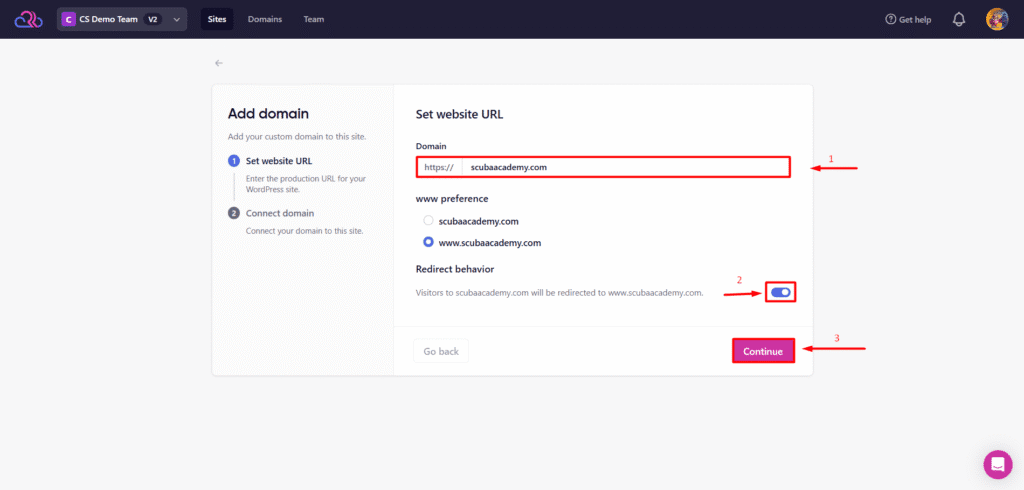
- Enter your primary domain name in the Domain field.
- Choose your preferred domain version, with or without www.
- Enable redirect behavior to redirect traffic to your preferred version.
- Click Continue to proceed.
This defines the primary URL visitors will use to access your website.
Step 4: Select DNS Provider and Add API Token
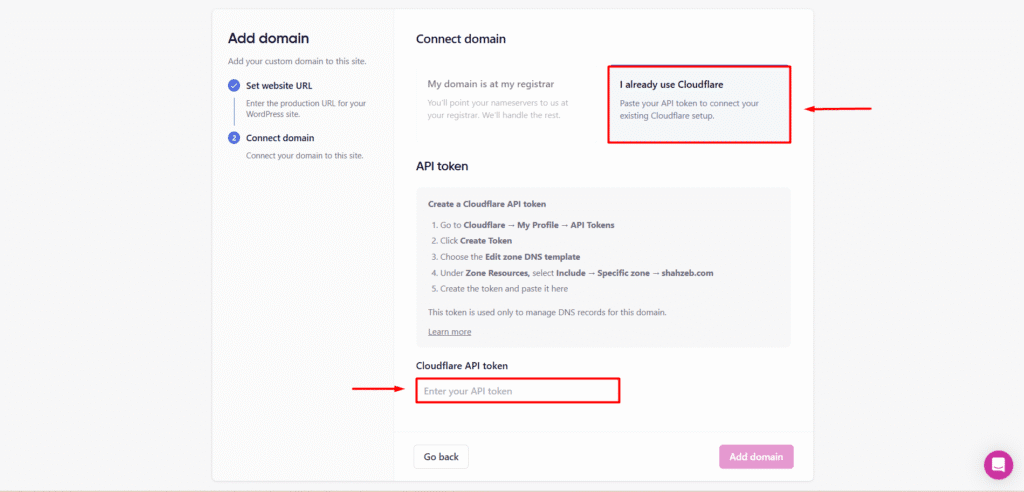
When connecting your domain, you’ll be asked where your DNS zone is currently managed. You can choose Cloudflare or Another Domain Registrar.
If your domain is already managed on Cloudflare
We’ve made this process incredibly simple.
- Select Cloudflare as your DNS provider.
- Generate a Cloudflare API token from your Cloudflare account with permission to manage DNS for the selected domain.
- Paste the API token into the Cloudflare API Token field in the Rapyd Cloud dashboard.
- Click Add Domain to continue.
Rapyd Cloud will automatically connect to your existing Cloudflare account and import your domain configuration.
There is no downtime, and you do not need to move or replace your existing Cloudflare account.
If your domain is not managed on Cloudflare
- Select Another Domain Registrar.
- Rapyd Cloud will provide Cloudflare nameservers from our enterprise Cloudflare account.
- Update your domain’s nameservers at your current registrar to the provided values.
- Once DNS propagation completes, your domain will be connected to Rapyd Cloud’s enterprise Cloudflare CDN.
This allows Rapyd Cloud to securely manage the DNS records required for CDN activation.
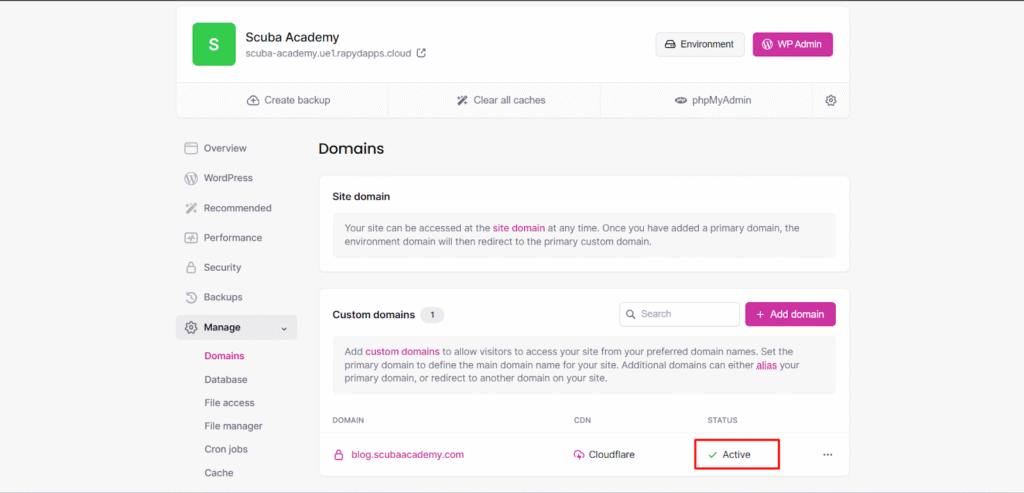
Step 5: Verify Domain Status
- Return to the Domains section.
- Locate your newly added domain in the list.
- Confirm that the Status shows Active and the CDN column displays Cloudflare.
This indicates that the domain has been successfully connected and CDN delivery is enabled.
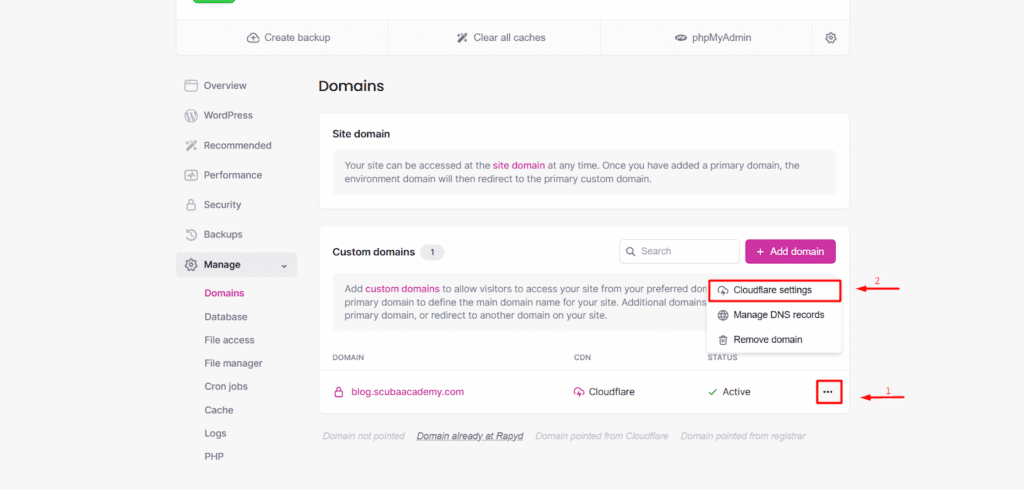
Step 6: Access Cloudflare Settings
- Click the three-dot menu next to your active domain.
- Select Cloudflare settings from the dropdown.
This opens Cloudflare-related controls for the selected domain
Step 7: Confirm Cloudflare Is Active and Configure Options
- Navigate to the Performance section in the site dashboard.
- Confirm that Cloudflare is shown as active for the domain.
- Review available options, such as full-page caching, cache purging, and development mode.
- Adjust the settings as needed to meet your website requirements.
Your site is now delivering content through Enterprise Cloudflare CDN.
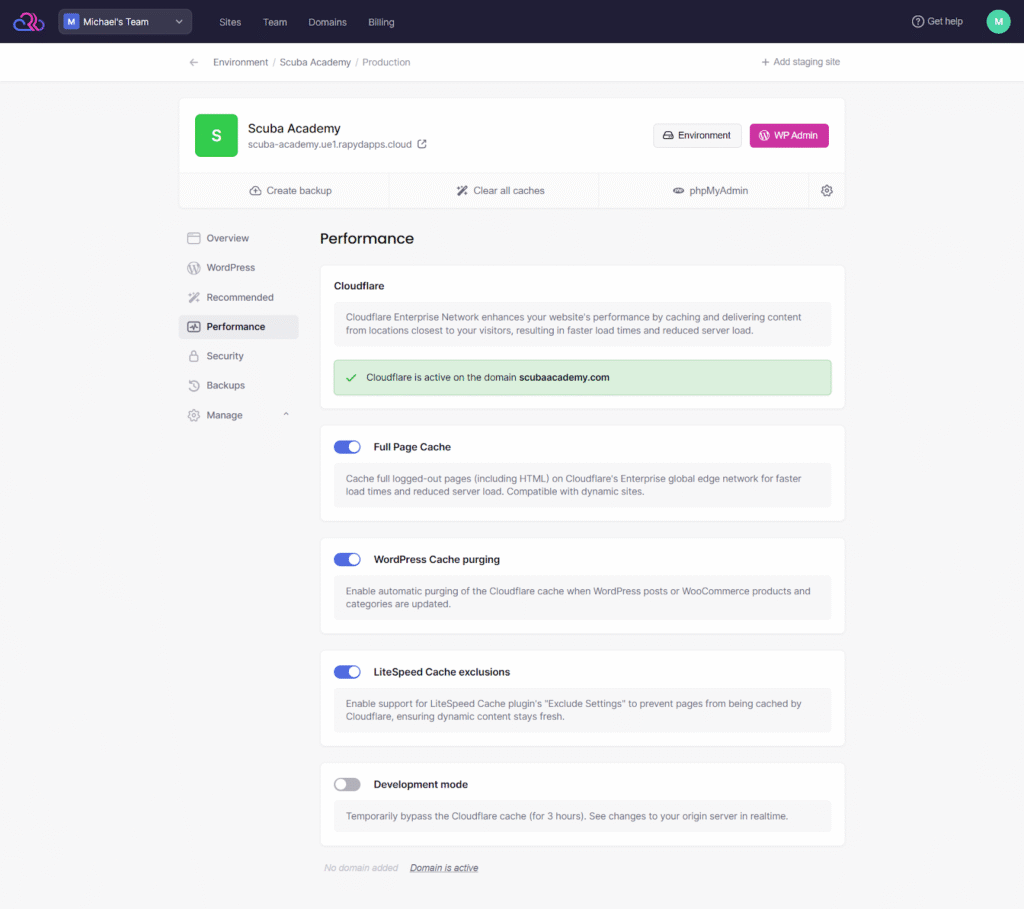
The screen above displays the Cloudflare performance options available in Rapyd Cloud. Each setting controls how content is cached and delivered for your domain.
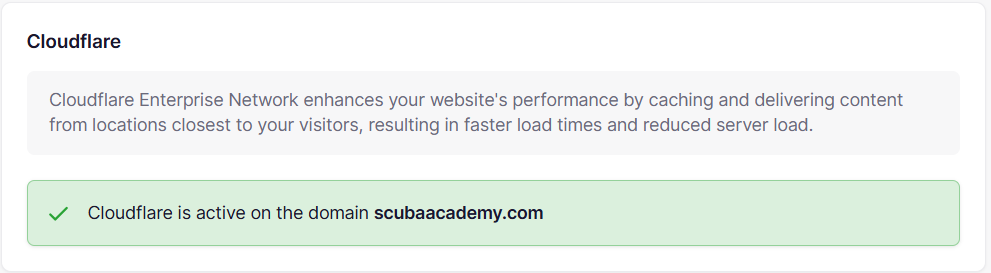
Cloudflare status
This section confirms whether Cloudflare is active on your domain. When active, content is delivered via Cloudflare’s global network, improving load times and reducing requests to the origin server.

Full Page Cache
This option enables caching of full logged-out pages, including HTML, at Cloudflare. It helps improve page load times and reduce server load by serving cached pages directly to visitors instead of processing every request on the server.

WordPress Cache purging
This option automatically clears the Cloudflare cache when WordPress posts or WooCommerce products and categories are updated. It ensures visitors see the latest content after changes are published without requiring manual cache clearing.

LiteSpeed Cache exclusions
This option is not part of the Enterprise Cloudflare CDN integration itself. It is provided by Rapyd Cloud to simplify cache management. When enabled, Cloudflare respects the exclusion rules defined in the LiteSpeed Cache plugin, allowing you to prevent specific pages from being cached at the CDN level.

Development mode
This option temporarily bypasses Cloudflare caching for a limited time. It is useful when testing changes on your site, and you need to see updates immediately. Once testing is complete, this option should be disabled to resume caching.
Final Thoughts
Since announcing our partnership with Cloudflare in 2026, Rapyd Cloud has continued to expand and refine the features available on our managed hosting platform. The goal of this integration has been to make faster, more reliable content delivery easily accessible to WordPress websites, businesses, agencies, and growing online projects.
By adding Enterprise Cloudflare CDN support directly into Rapyd Cloud, we’ve improved performance, reduced server load, and simplified CDN management without increasing operational complexity.
Existing customers using the Rapyd CDN powered by NOC can re-add their domains under Cloudflare as the DNS provider to benefit from this enhanced setup.
We remain committed to further improving this experience. Customer feedback plays an important role in shaping new features and enhancements, and we actively review suggestions shared through our support channels and community discussions.
Looking ahead, we will continue to refine and enhance our platform to better support your websites as they grow. If you have feedback or feature suggestions, we encourage you to share them with us so we can continue building a better hosting experience together.
Frequently Asked Questions

Q1. Can I host WordPress on Cloudflare?
No, Cloudflare does not provide web hosting. Cloudflare works as a Content Delivery Network and security layer that sits in front of your hosting server. With Rapyd Cloud, your WordPress site is hosted on our managed infrastructure, while Cloudflare helps improve content delivery and performance.
Q2. Is Cloudflare good for WordPress websites?
Yes, Cloudflare works well with WordPress websites. It improves page load times by caching static content and delivering it from locations closer to visitors. When used with Rapyd Cloud hosting, it helps reduce server load and improve overall site performance.
Q3. How do I add Enterprise Cloudflare CDN to my WordPress site on Rapyd Cloud?
You can enable Cloudflare CDN directly from the Rapyd Cloud platform. Simply add your primary domain, select Cloudflare as your DNS provider, and complete the setup using your Cloudflare API token. There is no need to manually change nameservers or install additional plugins.
Q4. Does Cloudflare improve website speed?
Yes, Cloudflare improves website speed by caching static assets such as images, CSS, and JavaScript and delivering them from its global network. With Cloudflare through Rapyd Cloud, you also benefit from full page caching of public webpages. This reduces latency for visitors and decreases the number of requests reaching the origin server.
Q5. Is Cloudflare a plugin?
No, Cloudflare itself is not a plugin. It is a network-level service. Cloudflare provides an optional WordPress plugin, but when using Cloudflare through Rapyd Cloud, CDN functionality is enabled at the platform level and does not require a plugin.